
Asustor AS1202T
- Feb 28
- 13 min read
Updated: 7 hours ago

ASUSTOR, a subsidiary of Taiwan-based ASUS, has unveiled the second generation of its affordable network storage devices—the AS1202T and AS1204T models from the Drivestor Gen2 series. These new products are aimed at home users and small businesses, offering a significant performance boost over their predecessors while maintaining an affordable price. The main update in Gen2 is the processor upgrade. Instead of the RTD1296 with four Cortex-A53 cores running at 1.4 GHz in the first generation, the new models feature a more energy-efficient quad-core Realtek RTD1619B based on the Cortex-A55 and clocked at 1.7 GHz. The chip is still complemented by 1 GB of DDR4 RAM (soldered on the board, not expandable) and 8 GB of integrated eMMC storage for the ADM operating system. The networking capabilities of the new NAS remain the same as their predecessors—the AS1102T and AS1104T, released in 2021, also featured a single 2.5 Gbps Ethernet port. Three USB 3.2 Gen1 ports (5 Gbps) are provided for connecting peripherals. One is located on the front panel and supports the One Touch Backup feature (plug in a flash drive, press a button, and the data is automatically copied to the NAS). The other two ports are located near the fan.
While those specifications aren’t high-end or breathtaking as such, they do have their advantage. They allow Asustor to keep the asking price very low and offer the world of NAS to everyone. You don’t need to be rich to get a unit such as this and enjoy the benefits of a centralised storage setup.


Packaging & Contents

Asustor Drivestor 2 AS1202T is delivered in white box packaging, label to the right, offering model identification alongside hardware features. Key features of the Asustor Drivestor 2 AS1202T include quad-core processor, external 3x USB 5Gbps ports, 2.5 Gbps wired connection, tool-less installation, Wake on WAN, silent design, and a three-year warranty. It has a carrying handle, so you can easily move it around.

Company's logo is printed at the back.

The right side providing the main features, including the use of ADM operating system, functional design for enthusiasts, life-like applications, built-in monitoring center, etc. In addition, Asustor also provides cross-platform and mobile APP capabilities.
The right side of the box offers full features.

A label at left side of the box offers full hardware specifications along with package contents. Zoom in to see the hardware specifications. You can see that this Asustor Drivestor 2 AS1202T uses Realtek RTD1619B 1.7GHz quad-core processor, and the memory is 1GB DDR4.

The AS1202T is packed very well. The unit is protected by a plastic bag and two polyfoam pads that provide sufficient protection.

In the Asustor AS1202T box we find everything you need to be able to use the NAS in its full functionality. In addition to the NAS we find a power supply with its cable, an Ethernet Cat 5e cable, 8 screws to fix the disks and a quick guide to the initial configuration. Next, let's look at the appearance configuration of Asustor Drivestor 2 AS1202T.
The Nas

The NAS is built with a good combination of plastic and metal and conveys a great sense of solidity and strength , also confirmed by the weight of 1.14 kg.

The dimensions are quite small, we are talking about 165x 102 x 218mm.

The front of the unit features an Asustor logo in rose gold and a faceted design finish. It is an entry-level model, so does not have the status display screen of the mid-to-high-end series, but it has a panel appearance with a rhombus design, and it will not be too ugly when placed at home.

The facia additionally features a small assortment of indicator LEDs and what seems to be a sensor like these used with infrared remotes. The upper left corner of the front is the status indicator, from top to bottom are the power, system status, network and hard disk operation indicators. The lower left corner of the front is a USB 5Gbps port, which allows users to connect an external hard drive or SSD to expand the capacity, or copy the data in the NAS to an external hard drive for cold storage backup.

The rear configuration of the Asustor AS1202T uses a single fan to dissipate heat, and provides two USB 5Gbps ports and a 2.5 Gbps wired network port. In addition, the round button in the upper right corner is the power button of AS1202T, and there is a RESET reset pin jack below. Compared to the more advanced lines of Asustor, the AS1202T does not have an HDMI cable to directly transmit images to the screen, TV to reduce costs. There is a hand-turned screw at the top of the rear of the body, which can be opened to the outside after turning it open. There's also the DC input from the external power brick. One thing to note with NAS enclosures is the lack of any dust filters. You will need to remove the drive bays to give the inside a quick clean.

After flipping the unit upside down, you’ll find four rubber feet that help make it quieter. On the base of the device, we find some ventilation to keep the internals cool.
Installation

The internal state after removing the outer cover provides space for two 3.5-inch or two 2.5-inch hard drives. The position of the cooling fan at the rear of the case can provide cooling airflow from the opening of the hard disk bracket.

The two slots support standard 3.5-inch or 2.5-inch SATA hard drives but are notoriously absent the new M.2 standard. With the largest SATA drives presently obtainable, this NAS may maintain 40TB (2x 20TB), and by attaching exterior growth through the USB ports, even higher total capacities might be achieved. Mounting drives could be very simple. You must use the hand screws in the package to fix it. There aren’t any rubber grommets or different cushioning between the bodily drives and the steel body. With two drive bays, there are limited RAID modes available. These include RAID 0 (striping), RAID 1 (mirroring) or JBOD (Just a bunch of drives) where drives aren’t dependent. What isn’t available is RAID 5, as this requires a minimum of three drives. The only redundant drive mode here is mirroring. The system supports RAID 1 - that is, two hard drives store the same data in parallel, ensuring safety when one of the two drives is at risk of failure, there will still be another drive.
Internal Hardware

The metal shell with large heat sinks helps the system operate more stably. The position of the motherboard is set under the hard disk rack, and there is a configuration of heat sinks above the processor. Inside the Asustor AS1202T is a Realtek RTD1619B, which has four physical cores and is capable of bursting up to 1.7GHz. You don't get Plex hardware transcoding, and the NAS isn't designed to be a Plex server; yes, you can install the native Plex client and stream to connected devices, but it hits its limit with high bitrate content. That said, the AS1202T provides one of the most affordable ways to get your hands on the outstanding ADM software. You get a robust set of utilities that let you back up data from your phones and other devices with ease, set up a lot of custom services, and generally reduce your reliance on public cloud storage services. While it lacks the advanced capabilities of x86 AMD or Intel processors, it also doesn’t have their higher price tags or energy consumption. Being ARM-based, this CPU compresses commands to use less power, and with ongoing advancements in software, ARM processors have become increasingly effective in NAS systems.

The system also includes 1GB of memory that, alongside this CPU, is actually quite good value and is enough to get a handful of decent applications running simultaneously very well. Also, this memory is DDR4 in architecture, at 2400Mhz, a noticeable upgrade over the 1GB and 512MB DDR3 at 1600Mhz in its predecessors. As good as this all sounds, the system generally will be utilising 20% of this to keep the system running in the background and the fact that you cannot upgrade this memory beyond this point does result in the system having a slight glass ceiling in terms of simultaneous users and services. The AS1202T only having 1GB that cannot be upgraded is something that really nails this NAS down a bit in terms of potential performance in a number of ways.
Initialization
The whole point of a NAS device versus building your own is in its simplicity, and the AS1202T delivers. Simply plug in the power cable, connect an Ethernet cable, turn the box on, and you're done. The browser setup process is simple and intuitive and allows us to choose between automatic and more advanced manual configuration. The automatic option takes us with a few simple clicks to have the NAS correctly configured in a few minutes . The advanced mode, on the other hand, allows us more customization, allows us to choose the disk configuration mode between JBOD, RAID0 and RAID1 , but it remains quick and immediate. The process is simple. Start by downloading the ASUSTOR Control Center application onto your computer. It is simply a way to identify all of the Asustor devices on your network without having to manually find the IP address.


After about ten minutes, the first boot will be completed and we will arrive at the management page of the NAS based on the ADM (Asustor Data Master) system. The NAS operating system is to all intents and purposes a complete system with a pleasant graphical interface based on windows and icons, the ability to install applications through a dedicated store and various customization possibilities.






ADM

The ADM 5.1 system is easy to understand and very simple to use, it closely resembles the operating systems we are used to using on a daily basis and provides us with an interface made up of windows and icons that make every operation easy to manage.

Firing up your personal settings inside the web admin will allow you to switch window styles and change between light and dark modes. The best part is the ability to create, export, or import custom themes. It's a nice touch to help personalize your NAS experience, especially if you frequently visit the web UI. Once you have got the hang of user and account control versus your file shares, we move up in ADM to an activity monitor. In general: you can track operations within the NAS, ranging from CPU activity to all active processes. The General tab allows you to change default HTTP/HTTPS ports, set the language, and configure an automatic log-out timer. This tab also includes options to configure the login page's look.

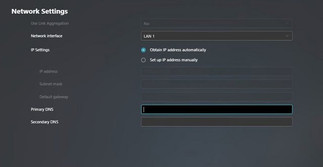
Network settings allow you to set the server name, which will identify the NAS to the network, default gateway, and IP LAN port ID. There are also some options available here to set the Wi-Fi dongle's properties if you have one attached to the NAS.

The Hardware tab is full of configurable options as it allows you to, for example, adjust the brightness of the NAS server's LED indicators. You can also enable or disable the buzzer for various events, disable the reset button on the back, set the disk-hibernation time, and enable or disable EuP Mode. Attention must be given to the fact that enabling EuP will disable Sleep Mode, Auto Power Resume, Wake-on-Lan, and Power Scheduling Services.

EZ Connect function automatically helps users to easily configure port forwarding services no matter if they are new to NAS or an IT professional.

You can format an external storage device into all popular file systems. The External Devices menu allows you to control all currently connected devices.

Configure user- and group accounts, set domain users and groups, manage shared folders, and set application privileges in ADM's Access Control panel. You can also set user access rights to various applications for individuals or groups here.

Storage Manager allows you to check on or configure the NAS server's volume(s). You can also check the disks and create an iSCSI target and LUN. Using iSCSI will make the disks inside the NAS appear as local disks on any client PC; however, all data will be transferred to and from them over the network. LUN stands for Logical Unit Number: numbered disk drives the client PC's operating system sees as volumes.

The Web Center is another feature. This lets you set up and host your own website right on the NAS enclosure. No longer will you need to fork out $5 per month for shared hosting (or more for a virtual private server). Asustor makes it really easy to get started too with but a few buttons to install PHP and Apache.

Activity Monitor shows how heavily the CPU's cores, memory, and network port are being utilized.

It also shows how heavily the disks are being taxed and lists all running processes and the resources these use.

If we move up towards App Central then that's where all the extras start to show. The days that a NAS unit was merely a file-server are long gone, ever since a year or three, applications can be installed onto your NAS. At the time of writing, the list of available apps listed for the AS1202T is over 250 and counting.

Asustor’s LooksGood is a response of its own to the PLEX-like media-center application. It will index the suitable multimedia content, display information and also allow immediate playback. LooksGood can also transcode the content in order to have it ready for different device types.

The Asustor Download Center is an easy to use download manager for torrents, which does also include a search function.

DataSync for Google Drive is allowing the user to synchronize a specific Google account to the server.

Photo Gallery 3 is an easy option for organizing our photo collection, generating slideshows and so on.

SoundsGood is the Asustor application module for audio content.

Hi-Res Player is another alternative to the SoundsGood application.

If we do have IP cameras available, we can always use Surveillance Center for monitoring and recording purposes.

Content management systems such as Joomla 3 are also available for the administrator to install on the NAS.

WordPress is also handy for us to install and configure.

Of course, the well-known PLEX application is not missing from the application list.

Transmission is another option for the user to download torrents.
Asustor is also puts the user some mobile applications for easy management and for accessing the resources. One of it is AiMaster, which allows us to access the NAS configuration and more.


AiFoto 3 is the mobile version of the photo browsing application.

AiVideos for working with video content is also available as a separate application.

AiRemote turns your smartphone or tablet into a remote control, keyboard and mouse for Asustor Portal.

Get access to your data in the cloud and on your NAS from the convenience of your mobile device with Asustor's AiData mobile app.
Performance
We did not change our test setup for this article, so we used in turn two Samsung 870 EVO 1TB SSDs and two Toshiba MG09 18TB hard drives.


As we expected, with a single HDD unit the maximum transfer rates will be around 115 MB/s for reading and writing , not taking full advantage of the 2.5 Gbps link.
1 GB files, RAID 1, 1 GbE


We can take advantage of the 2.5 GbE network connection, achieving transfer speeds of over 220 MB/s.
1 GB files, RAID 1, 2.5 GbE


The ARM processor isn't a powerhouse, and as we've mentioned, it will struggle with tasks like virtualization. However, this "weakness" has an advantage: combined with the architecture's efficiency, it reduces power consumption and heat for a chip that operates at its best. The Asustor AS1202T is one of the most energy-efficient home NAS devices we've tested. Of course, heat generation is also very low. A welcome feature.


Final Thoughts

In this way we come to the end of this review of the Asustor Drivestor 2 AS1202T. While a budget model, the AS1202T is an entry-level device and Asustor's somewhat ambitious offering. It's ambitious because it features a 2.5 GbE network controller for more than respectable speeds and, of course, benefits from the company's excellent ADM 5.1 software interface. The system's overall performance meets expectations. The product has a simple design but full of features and good configuration compared to the price range. Also useful is the presence of the three 5Gbps ports ports that allow you to easily connect hard disks and external memories and then perform further backup or copy and share data operations. Inside, this device sports a Realtek 1619B processor, which is more powerful than you might expect for a budget NAS. It's a quad-core Arm chip, but what really sets it apart is the Mali G57 GPU. This component is fast enough to transcode moderate bitrate 4K video, making the AS1202T a great little media server, either via a platform like Plex. The key advantage of the new processor is the updated iGPU graphics unit with a hardware AV1 decoder. This ensures smooth playback of 4K video at 60 frames per second using the proprietary LooksGood app without straining the main processor cores. The AV1 codec is becoming the standard for streaming services due to its better compression while maintaining quality compared to H.264, so its support is a welcome addition. ASUSTOR also places an emphasis on protecting personal data. The ADM 5.1 operating system is built on the Linux 6.6 LTS kernel and includes support for post-quantum cryptography (PQC) with hybrid TLS encryption according to the NIST standard. The system uses the Kyber algorithm (X25519+ML-KEM 768) over TLS 1.3, protecting data from potential attacks by future quantum computers, including the possible "collect data now, decrypt later" scenario. However, given the 3-5-year refresh cycle for home NAS devices, by the time a real quantum threat arrives, these devices will almost certainly be obsolete in other respects. To protect your information, we offer Snapshot Center with support for up to 256 snapshots of Btrfs volumes, DataSync Center for synchronization with cloud services (Google Drive, Dropbox, and others), and Cloud Backup Center for backups to Amazon S3, Microsoft Azure, Backblaze B2, and more. Built-in ADM Defender offers customizable firewall profiles and intelligent blocking of suspicious IP addresses. It supports AES-256 folder encryption, two-factor authentication, and Wake-on-LAN/WAN for remote power management. It's no secret that home NAS devices are often used to set up video surveillance systems. Drivestor Gen2 can function as a video surveillance server—out of the box, users have access to four free IP camera channels via the Surveillance Center app, with the option to expand to 12 cameras with paid licenses. As good as it is, the Asustor AS1202T is still going to be something of a disappointment to hear that you cannot upgrade this memory beyond one gigabyte later on. However, the ARM-based processor in the AS1202T is designed to be as efficient as possible, and one of the ways to improve memory efficiency is by directly soldering the memory to the PCB motherboard of the NAS. Consequently, you are not able to upgrade the memory and the minute you start to grow the number of simultaneous operations and user activities, that one gigabyte of memory is going to feel particularly limiting. Finally, talking of features that other devices in the Asustor family support that are absent here, the AS1202T lacks any M.2 NVMe slots. Now on the face of it, this is not a big deal as practically no value series Asustor NASs have ever supported M.2 bays.

One of the most appealing aspects of the Asustor Drivestor 2 AS1202T is its affordability. The average price for the unit is 200€. Of course, you also need to buy two storage drives, which will vary in price depending on your needs. The AS1202T is best suited to anyone who doesn’t want to spend much to incorporate a NAS device into their storage and backup system. The no-fuss setup process and operations, plus the low cost, make it a great option for those just getting started. It’s an entry-level model, so it’s not best for power users or businesses. Whether you’re looking to buy your very first NAS or need something more affordable for collaborating within the same office, the AS1202T is a good match. Having access to the ADM 5.1 is one of the highlights as it’s a powerful software solution, even with limited hardware. Asustor shows everyone how a budget NAS is made, and made well. If you want centralised storage on a budget, AS1202T is the way to go.


